A bag can look perfectly suited to work while making the journey there surprisingly awkward. The laptop tilts, the handles slip off your coat and your keys disappear beneath your lunch. If you are choosing between a tote and a shopper, the useful distinction is how each bag holds your belongings and sits against your body.
The names overlap, so neither label guarantees a particular shape or level of organisation. A tote is generally an open, two-handled carryall; a shopper usually suggests a roomy bag intended to accommodate shopping and everyday extras. Either can be structured or soft. For daily work, look past the description and assess three things: structure, laptop fit and shoulder comfort.
What is the difference between a tote and a shopper?
A tote often has a straightforward rectangular or slightly tapered shape, with two handles attached to the upper edge. Work-oriented versions may have a flat base, a fastening and internal compartments. Others are little more than a fabric rectangle with straps, so the word alone tells you very little about suitability for commuting.
A shopper tends to emphasise capacity. It may have a wider opening, generous sides or a softer body that expands around what you put inside. That flexibility is handy for carrying a cardigan or collecting groceries on the way home, but it can also allow smaller possessions to gather at the bottom.
Think of the distinction as a starting point, rather than a strict rule. A structured shopper with a secure laptop section may suit office life better than a flimsy tote. Equally, a simple tote can work beautifully when your daily load is light and already organised in pouches.
Start with what you actually carry
Before comparing bags, lay out the belongings you take to work on an ordinary day. Include the less photogenic essentials: charger, lunch container, umbrella, glasses case and any shoes you genuinely need. A bag chosen around a laptop alone may become overcrowded once everything else goes in.
Separate everyday necessities from occasional additions. If you carry a computer only once a week, a dedicated laptop compartment may be less useful than a removable sleeve. If it travels with you every morning, keeping it upright and apart from other items deserves more attention.
- Laptop every day: prioritise a secure fit, a stable base and handles that remain comfortable when loaded.
- Notebook and a few essentials: a lighter tote may provide enough room without unnecessary bulk.
- Work kit plus changing extras: a shopper’s flexible capacity may help, provided the contents stay manageable.
Choose structure that helps your working day
When a structured bag earns its place
A defined base and supportive sides help a bag keep its shape as you pack and unpack it. This can make folders easier to retrieve and stop a soft lunch pouch pressing directly against your laptop. A neater outline also sits naturally with tailored trousers, a blazer or a simple work dress.
Check how that structure is achieved. Thick panels, substantial hardware and multiple dividers can add weight before you put anything inside. A bag that feels reassuringly solid when empty may feel cumbersome on a walk from the station. Look for enough support to contain your belongings without carrying more construction than you need.
When a softer shopper makes sense
A flexible shopper can sit closer to your side and accommodate awkward shapes more easily. It works well with relaxed office clothes, particularly when you prefer an unforced silhouette over a rigid outline. However, a soft body needs a little packing discipline to prevent everything sliding together.
A removable organiser can help, but check its weight and dimensions too. It should leave usable space rather than turn the bag into a crowded collection of compartments. For a modest daily load, one zipped pouch for small essentials may be sufficient.
Check laptop fit beyond the screen size
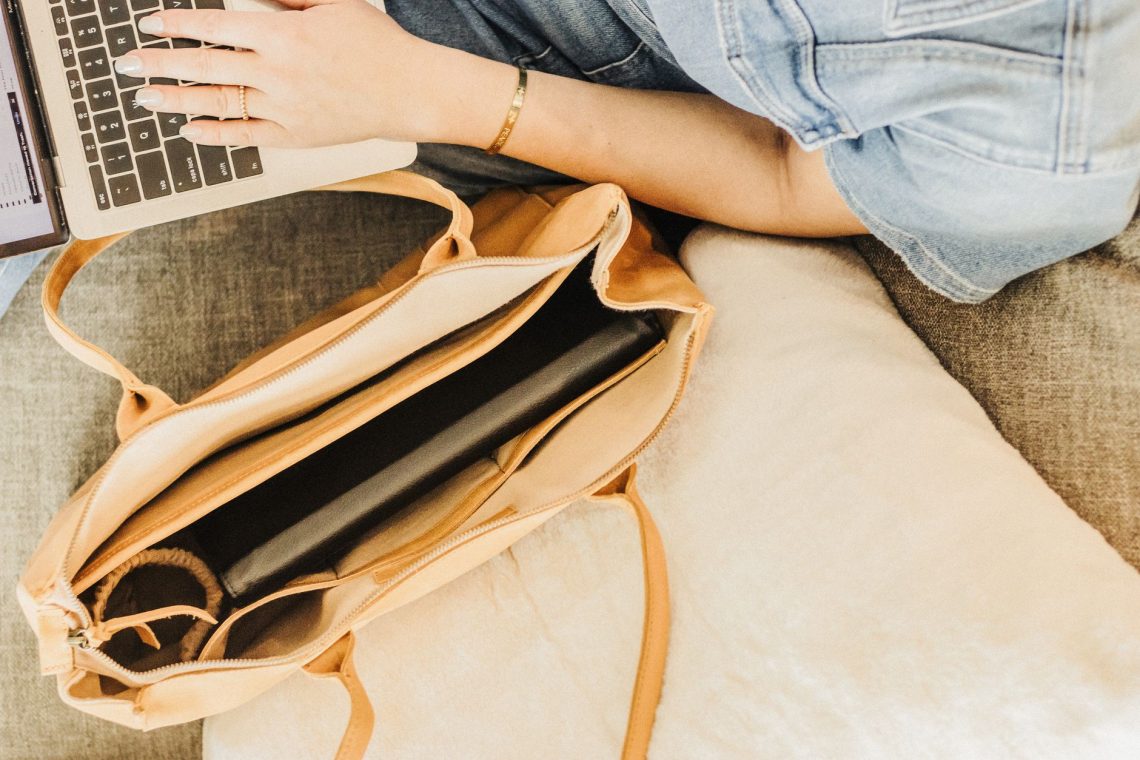
A laptop’s advertised screen measurement does not describe its full width, depth or thickness. Measure the device in the sleeve you intend to use, then compare that with the bag’s usable internal space. A narrow opening or tapered corners can make access difficult even when the stated dimensions sound generous.
The computer should slide in and out without forcing the fastening or stretching the sides. Check that the bag closes with your normal belongings inside. If the laptop protrudes above the top, it is exposed to knocks and rain, and you may find yourself holding the bag awkwardly to compensate.
A separate padded compartment helps keep the device away from loose objects, although padding varies. Feel the bottom as well as the sides: a compartment may look substantial while offering little cushioning underneath. A sleeve can add protection, but it also takes up room and cannot make an unsuitable bag fit properly.
Keep drinks upright in a separate, secure section where possible, and check their lids before packing. An internal bottle pocket is useful for organisation; it is not a guarantee against leaks. Avoid wedging a bottle tightly beside your computer simply because both technically fit.
Make shoulder comfort part of the fitting
Handle drop is the distance between the top of the bag and the underside of the handles. It determines whether you can comfortably wear the bag over your shoulder. Try it over the kind of outerwear you commute in: handles that fit over a thin blouse may feel restrictive over a wool coat.
The bag should sit where your arm can rest naturally. If it is tucked tightly into your armpit, reaching inside becomes awkward. If it hangs very low, it may swing against your hip or pull away from your body as you walk.
Strap width and finish matter alongside length. Narrow, stiff handles can feel concentrated against the shoulder under a heavy load, while a broader strap may distribute contact more comfortably. Smooth finishes can slide on some fabrics; rough edges can catch delicate knitwear. Inspect the underside and edges, not just the visible surface.
If you can try the bag with permission, use a representative load and walk around for a few minutes. Notice whether you keep hiking one shoulder, gripping the handles or adjusting the bag. These small compensations are useful clues. A tote or shopper remains a one-shoulder carry, so regularly heavy loads may call for a different carrying style.
Use fastenings and pockets with purpose
A wide opening makes packing easy, but consider where you travel. A zip can help contain belongings when the bag tips and gives more coverage on busy journeys. A magnetic fastening is quick to use, although gaps may remain at either side. Check whether you can operate it comfortably with the bag loaded.
Choose pockets around habits you already have. A secure place for keys, a reachable compartment for a travel card and one pouch for beauty essentials often provide more practical organisation than numerous tiny sections. Keep lipstick and hand cream contained so they cannot mark the lining or your paperwork.
Choose the bag that fits your routine
For a daily laptop commute and a tailored wardrobe, start by looking at totes or shoppers with a stable base, secure closure and suitable internal support. For lighter office days with variable extras, a softer shopper may offer useful flexibility. In either case, check the empty weight before filling it.
Colour and texture can then do the styling work. Black, chocolate, navy or tan can slot easily into many work wardrobes; choose the shade that relates to the shoes and outerwear you wear most. A restrained finish is especially versatile when the bag needs to move between casual commuting clothes and meetings.
The right choice is the one you can pack, close, carry and open comfortably on a normal working day. Judge the actual bag against that routine, and the tote or shopper label becomes a helpful description rather than the deciding factor.